

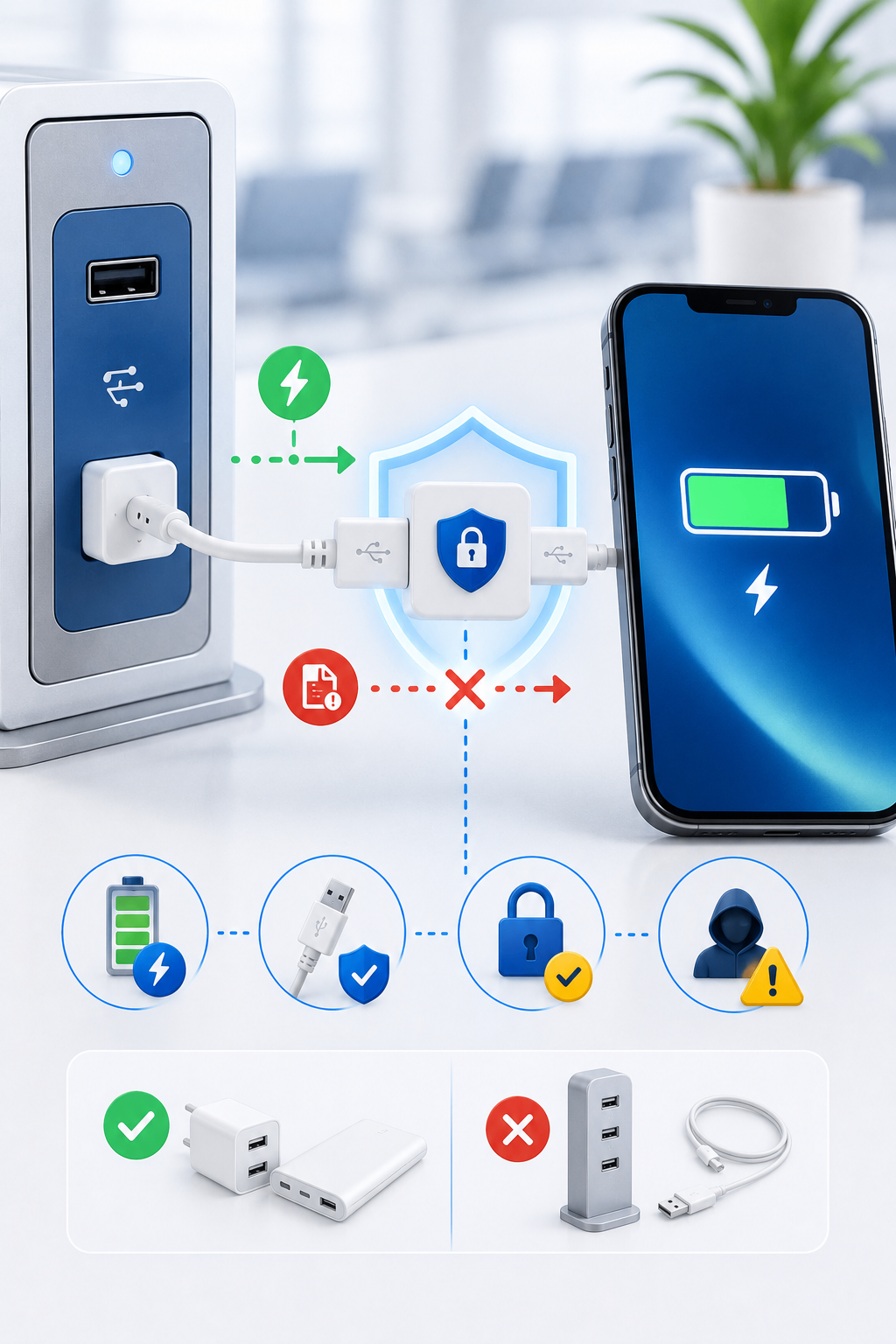
Public charging stations are convenient when a phone battery is low. Airports, shopping centers, hotels, cafés, public transport stations, and event venues may provide free USB charging ports.
However, not every USB port should be trusted.
A USB connection can carry both electricity and data. This means that an unsafe port, cable, or charging device may attempt to communicate with your phone or computer while it is charging.
Although attacks through public charging systems are not the most common form of cybercrime, understanding the risk helps users make safer choices.
Why USB Charging Can Create a Security Risk
A normal wall charger only provides power.
A USB connection, however, may also support:
- File transfer
- Device synchronization
- Software communication
- Debugging functions
- Peripheral access
If a charging station or cable has been modified, it may attempt to exchange data with the connected device.
This type of risk is often called juice jacking.
What Is Juice Jacking?
Juice jacking refers to an attack where a compromised USB charging port or cable is used to access data or install malicious software on a connected device.
Possible goals may include:
- Copying personal files
- Accessing photographs or contacts
- Installing malware
- Collecting device information
- Enabling unauthorized communication
- Exploiting an unpatched vulnerability
Modern phones include stronger protections than older devices, but unsafe USB connections should still be avoided when possible.
Not All USB Cables Are the Same
Some cables are designed only for charging, while others can transfer both power and data.
A malicious cable may look completely normal but contain hidden electronic components.
Such a cable could potentially:
- Act like a keyboard
- Send automated commands
- Open websites
- Install unwanted software
- Create a hidden remote connection
- Collect device information
Because the cable may look legitimate, visual inspection alone may not reveal the risk.
Where Unsafe Charging Risks May Exist
Potentially risky charging situations include:
Public USB ports
Charging ports in airports, hotel rooms, lounges, buses, or public waiting areas may be accessible to many people.
Unknown cables
A free cable found in a public place, received as a promotional gift, or borrowed from an unknown person should not automatically be trusted.
Shared computers
Charging through a public computer may create a data connection between the computer and the phone.
Rental vehicles and hotel entertainment systems
USB ports in vehicles, televisions, or media systems may request access to photos, contacts, or media files.
Untrusted power banks
A modified power bank could contain data-transfer or malicious hardware.
Warning Messages You Should Not Ignore
When connecting a phone, you may see messages such as:
- Trust this computer?
- Allow access to photos and videos?
- Use USB for file transfer?
- Enable debugging?
- Allow connected device to access data?
Do not approve these requests when you only intended to charge the device.
Choose a charging-only option where available.
How to Charge Safely in Public
Use your own wall charger
Carry a trusted power adapter and connect it directly to a normal electrical outlet.
This separates the device from unknown USB data connections.
Carry a power bank
A personal power bank allows you to charge without using public charging ports.
Make sure the power bank itself comes from a trusted source.
Use a USB data blocker
A USB data blocker allows power to pass through while blocking data connections.
It is sometimes called a USB condom or charge-only adapter.
Use a charge-only cable
A cable without data wires can provide power without allowing file transfer.
Keep the device locked
A locked device generally provides better protection than an unlocked one.
Reject trust requests
Do not select “Trust,” “Allow,” or “File Transfer” when using an unknown charging source.
Disable USB debugging
USB debugging should remain disabled unless it is required for a specific technical purpose.
Keep the operating system updated
Security updates may fix vulnerabilities that could be exploited through connected accessories.
What About USB-C?
USB-C is a connector type, not a guarantee of safety.
It can support:
- Charging
- Data transfer
- Video output
- External storage
- Docking stations
- Network connections
A USB-C port may provide many functions, so the same caution applies.
Use trusted chargers, cables, and adapters.
Can Someone Steal Data While the Phone Is Locked?
Modern mobile operating systems usually restrict data access when the device is locked.
However, risk may still exist if:
- The phone is outdated
- A vulnerability is present
- The user approves a trust request
- USB debugging is enabled
- The cable or accessory exploits another function
- The device was previously paired with the system
Keeping the phone updated and refusing unexpected permissions significantly reduces the risk.
Risks from Unknown USB Drives
The same caution applies to USB flash drives.
An unknown USB drive may contain:
- Malware
- Infected documents
- Malicious shortcuts
- Hidden scripts
- Modified firmware
Do not connect an unknown USB drive to a personal or work computer simply to discover what is stored on it.
Businesses should use approved procedures for checking removable media.
What to Do After Using a Suspicious Charging Port
If you connected your device to an unknown USB port and approved access:
- Disconnect immediately
- Lock the device
- Review recent applications and files
- Remove unfamiliar device trust relationships
- Disable USB debugging
- Run a security scan where supported
- Update the operating system
- Change important passwords if suspicious activity appears
- Review account login history
If the device behaves unusually, seek help from a trusted technician.
Public Charging Safety for Businesses
Organizations should create rules for employees who travel with company devices.
Recommended controls include:
- Issuing trusted chargers and power banks
- Providing USB data blockers
- Disabling unnecessary USB functions
- Using mobile device management
- Keeping devices updated
- Restricting external storage
- Training employees about public charging risks
- Reporting suspicious accessories or connections
Employees should avoid connecting company devices to public computers, unknown cables, or unapproved docking stations.
Final Thoughts
Public charging stations are convenient, but convenience should not replace caution.
The safest approach is to carry:
- A personal charger
- A trusted cable
- A power bank
- A USB data blocker
When connecting to an unknown USB source, never approve data access simply to charge the device.
A low battery is inconvenient, but protecting personal files, accounts, and company information is more important.